TenaxCode Android App
Trade anywhere with TenaxCode on Android
Stay connected to markets with an Android-optimized experience designed for quick decisions, clear charts, and simple order management.
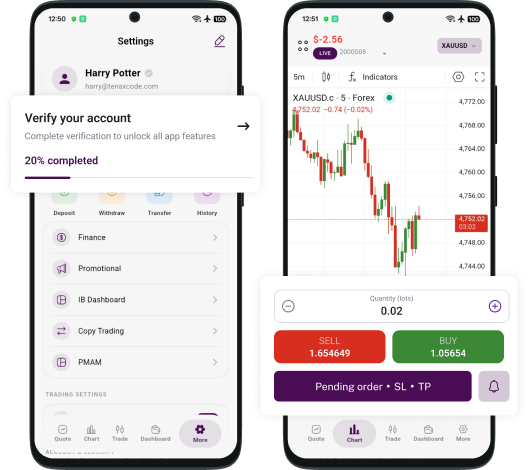
- ✓ One-tap trade execution and order management
- ✓ Advanced charts, indicators, and price alerts
- ✓ Watchlists and favorites for faster decisions
 Get on Google Play
Why trade on TenaxCode App
Trade on the move
Stay in control of your portfolio from anywhere with fast access to markets.
Charts and analysis
Use charting tools, indicators, and timeframes built for mobile clarity.
Alerts and monitoring
Set alerts and track key levels so you never miss the next move.
Secure access
Secure sign-in and session controls to help keep your trading activity protected.
Get started in 3 steps
A simple flow for staying connected to markets with TenaxCode.
Install the app from Google Play when available.
Sign in using your ABDFX account details.
Track markets, place trades, and manage positions.
TenaxCode Android app guide
Quick tips for getting the most out of your mobile workflow.
Build your watchlist
Save favorite instruments and sort them into your preferred order for fast access.
Use chart presets
Apply indicators and timeframes with presets so you can switch views in seconds.
Manage risk
Set stop-loss and take-profit levels, and monitor margin from the account panel.
Mobile highlights
A simple and powerful trading experience built for Android.
Quick watchlists
Track favorites with fast symbol search and clean lists.
Charts on the go
View timeframes, indicators, and key levels with mobile clarity.
Fast order tickets
Place trades with clear confirmations and SL/TP controls.
Account visibility
Monitor positions, margin, and balance from anywhere.
The ABDFX advantage
A strong trading foundation behind your mobile workflow.
Advanced technology
Fast trading workflow designed for clarity and speed.
24/7 dedicated support
Support available to help with onboarding and platform access.
Risk management
Tools and visibility to support responsible risk decisions.
Android FAQs
Common questions about TenaxCode Android.
Where can I download the app?
When available, it will be listed on Google Play. Contact support for launch updates.
Can I log in with my ABDFX account?
Yes. Use the same ABDFX credentials you use on the web platform.
Does it support SL/TP?
Yes. Set stop-loss and take-profit levels from the order ticket.
Is the data synchronized with web?
Your account, positions, and history stay consistent across platforms.
Need help getting started?
Contact support for onboarding, account setup, and platform access.